
Acuity Scheduling Advanced Tracking: Filters and Mappings
If you’re running Meta ads and sending Acuity bookings to Meta via Conversions API, you’re probably reporting more conversions than you should be. Usually this is simply because the tracking is broken, but it can also happen because the tracking system doesn’t know which bookings should count as ad conversions and which shouldn’t. That’s something we must define. Most setups skip this entirely.
Here’s what’s actually happening, and how to fix it.
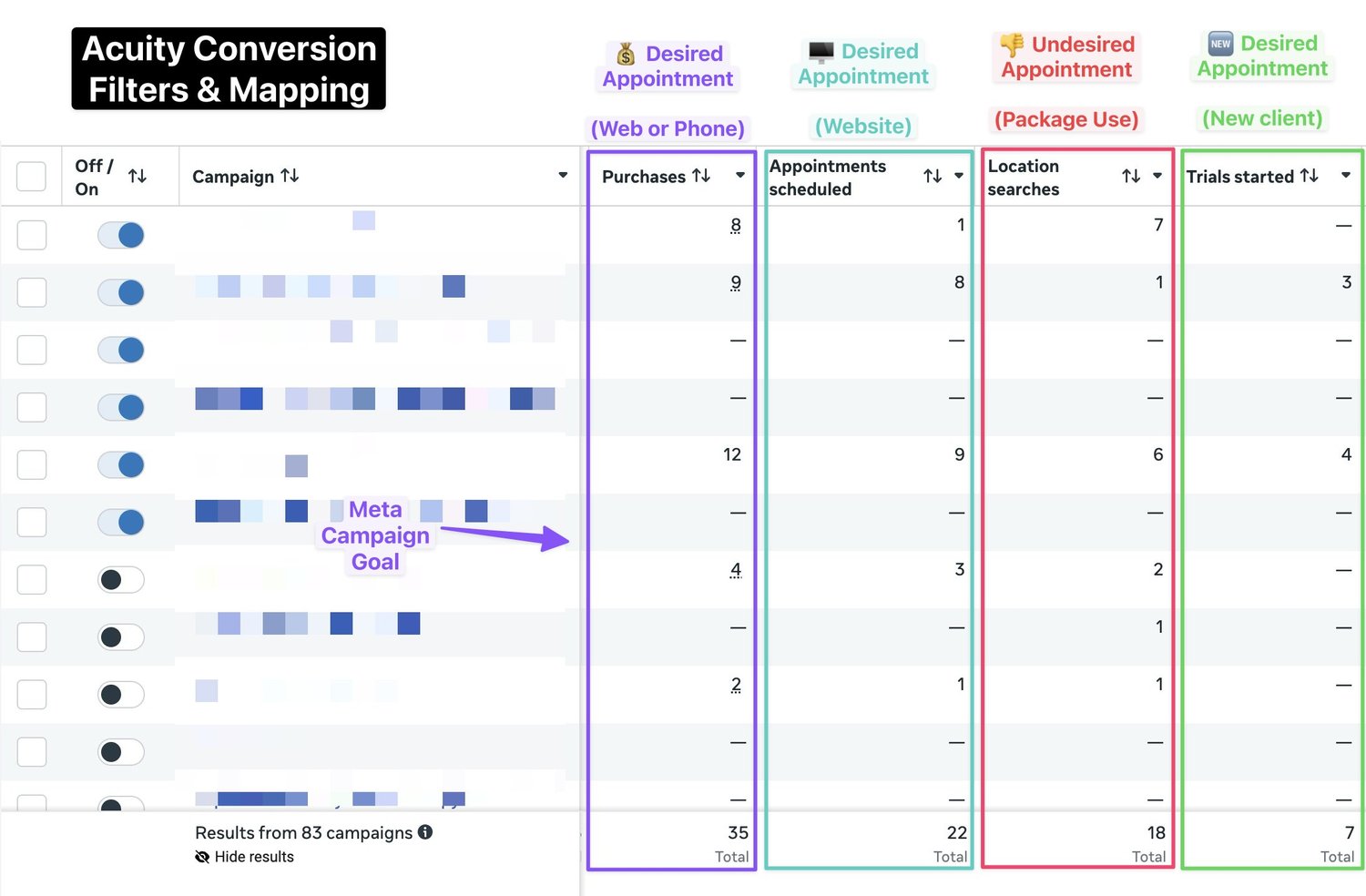
The problem: Acuity doesn’t know the difference
When a new potential client sees your ad, clicks through and books a consultation, that’s a conversion. Meta should know about it.
But Acuity also gets bookings for existing clients rebooking appointments they already paid for, customers picking up an order placed weeks ago, subscribers using their free monthly session, staff booking internal admin slots, and people coming in for a completely different reason than what the ad promoted.
When all of these hit your Meta Conversions API as “Purchase” or “Schedule” events, Meta thinks it’s doing great. ROAS looks amazing. CPAs look low. And then you increase your budget based on numbers that were never real.
I’ve now seen this exact pattern across multiple Acuity clients in completely different industries. Three cases stood out.
Case 1: Med Spa in Miami
Recently did full Meta CAPI + Pixel hybrid Acuity tracking for a Med Spa.
We quickly saw that while we were getting appointments and conversions, there was a complex mismatch in what Meta reported and what we actually wanted to see.
The problem: the studio had packages sold outside Acuity. Clients who had already purchased one (sometimes months earlier) would book a new slot in Acuity to use it. These were coming through as conversions. Meta was taking ‘credit’ for clients redeeming something they’d already paid for, and optimising toward people who were already customers. Exactly who you don’t need to pay to reach.
It might sound surprising, but the data clearly showed existing customers were still clicking on the business’ Meta ads. This pattern is consistent across many of my Acuity tracking clients. I double-checked one to verify whether their Acuity conversion was a Meta 1-day ad view, or a click. It was a click.
Fix
We created a specific Acuity appointment category for old customers’ package redemptions, and mapped those to separate, observe-only Meta events. Genuine new bookings (via the website or by calling and booking in Acuity admin manually) went through as Purchase. Purchase again being the Meta campaign goal the algorithm optimises towards.
The algorithm got cleaner data, performance improved dramatically.
Extra benefit: peace of mind. In addition to improved ad performance, the filtering resulted in clarity and peace of mind. Finally having all numbers match with ads, analytics and the real world.
Case 2: Fine jewellery studio, Australia
A high-end jeweller running consultation ads for custom engagement and wedding rings. Order would often be around $25,000. High stakes for low quality conversion data.
In addition to consultations for potential clients, Acuity also handled their ring collection and resize appointments. Both of these are post-purchase: the client already bought the ring, they’re just coming back to pick it up or get it adjusted.
Still, Meta was receiving all of these as conversions and treating them as new customer acquisitions. The feedback loop was messy: Meta would show ads to people who had already purchased, they’d come back to collect their purchase, Meta would claim another conversion. They would visit a third time to do a complementary ring resize, third conversion. Meta could just run retargeting, for customers that had already converted. Zero chance of someone purchasing a second engagement ring. Well, if not 0%, still damn unlikely 💁♂️
Fix
Ring collection and resize appointments were filtered out of the conversion feed entirely. This first resulted in some turbulence when Meta’s algorithm could no longer show lazy ads to customers who had already converted, but within 6 months the business did their highest sales in 12 years. Another interesting lesson: improvement in tracking accuracy might first confuse the algorithm. Pausing and re-starting Meta ads after Acuity filters were added fixed the performance immediately.
Case 3: Pottery studio, UK
A creative studio offering pottery classes with a subscription model. Clients could join monthly and book sessions for free as part of their plan. They also had pickup appointments for when a piece you’d thrown and fired was ready to collect.
Fix
With lessons learned from the previous projects, we nailed this one in the first round. For flexibility and to not need constant back-and-forth, we added a simple character prefix to the appointment category names, which lets the client filter unwanted conversions programmatically without emailing conversiontracking.io every time. New introductory class bookings went through as conversions. Existing subscriber sessions and pickups were excluded or mapped to separate observation events.
Two types of filtering: know which you need
After working through these cases, the approaches fall into two categories.
The first is filtering by appointment type. You know in advance which categories should never count as ad conversions: package redemptions, pickups, free subscriber sessions. You filter these out based on appointment name or category, either excluding them or routing them to a secondary Meta event for observation only. This is the most common fix and the one to implement first.
The second is filtering by client history. When a new booking comes in, you check Acuity’s API: has this person, matched by email or phone, ever booked before? If yes, returning client. If no, genuinely new. You then send a different Meta conversion event depending on the result. This is more advanced, requires two live API calls per booking, and is still experimental, but for businesses where new-versus-returning is hard to tell from appointment type alone, the signal quality improvement is significant.
What this looks like in practice
A well-configured Acuity → Meta CAPI setup typically has:
- Purchase (if paid Acuity appointments) or Schedule (for lead gen) — the primary event for all genuine new appointments, whether booked via the website or manually by staff
- FindLocation — handles package redemptions and subscriber sessions, observe only, never used for ad optimisation
- Some other event covers website-only bookings and acts as a sanity check on iframe tracking
- Subscribe and StartTrial — experimental events for confirmed returning and confirmed new clients respectively, useful for businesses where that distinction matters
We could use custom events like acuity_new_customer, acuity_old_customer, acuity_website, acuity_phone_call. That might be ideal long term. However, custom events need to be manually activated by running actual ads for these observe-only events — quite a hassle if you just want to observe numbers. Long term, custom events would be cleaner. For quick tests, any free standard event seems fine (as long as there is no risk it will be actually used).
Ads only optimise on Purchase. Everything else is observation: useful context, not algorithm fuel.
What about Acuity filtering on Google Ads?
Google Ads works differently, and the filtering problem might be harder to solve. Depends.
With Meta, you can send both the browser pixel and server-side CAPI events, then deduplicate. That gives you the volume of client-side tracking plus the flexibility of server-side. Meta can also match a conversion purely on email address or phone number, even without a click ID.
Google Ads doesn’t work that way. You’re mostly choosing between client-side tracking via GTM or server-side via the Google Ads API with a gclid. Server-side API imports do not support Enhanced Conversion Tracking, so it’s gclid or no conversion. Apple Intelligent Tracking Prevention might delete gclid cookies in 24h.
Most setups go client-side because it’s simpler and often captures more conversions, especially if Enhanced Conversion Tracking is installed properly via API with Acuity.
The problem is that client-side Acuity tracking only gives you the calendar name and appointment type. It does not give you the category. With Meta CAPI you can filter or reroute by category server-side before anything reaches the algorithm. On the Google Ads client-side, that data simply isn’t available.
One workaround that works well in practice: route the appointments you don’t want tracked as plain outbound links to Acuity, rather than iframe embeds on your site. If the pottery studio’s existing subscribers book directly in Acuity, those sessions never touch GTM. The jeweller’s ring collection page can link out to Acuity instead of embedding the scheduler. The filtering happens at the UX level, no custom code required.
The other layer is conversion value. Some clients include a budget question directly in the Acuity booking form. Server-side, you can use that to weight conversions differently. If you’re an ad agency and you have a form field asking for client budget, a $5,000 lead is lower value than a $500,000 lead.
So the real question: do you go server-side Google Ads tracking via the API, passing the gclid through the booking flow? You’ll lose 10–25% of conversions because gclid doesn’t survive every session. But you get full control over what counts, what gets filtered, and what value each conversion carries. Or do you do client-side enhanced conversions through GTM? Higher volume, easier to implement, but your options for filtering and value mapping are limited.
There’s no universal answer. For businesses with one or two clean appointment types and no real filtering needs, client-side is fine. For businesses with complex appointment structures, package redemptions, subscriber sessions, or wide variation in deal size, server-side is worth the conversion loss to get cleaner signal.
Why this matters more than most tracking fixes
Most conversion tracking improvements are about capturing more data: server-side tracking, better cookie handling, Conversions API instead of pixel-only. These are about not losing conversions you should be counting.
This is the opposite: removing conversions you shouldn’t be counting.
Both matter. But sending Google and Meta clean signal — fewer and more accurate conversions — often has a more immediate effect on performance than recovering a few missed ones. The algorithm is only as good as what you feed it.
If your Acuity business has multiple appointment types and you haven’t thought carefully about which ones should reach Meta, your current reporting is probably flattering you. Worth checking.
I build custom Acuity Conversions tracking setups. If your appointment types are complex and your tracking hasn’t caught up, get in touch.