
Acuity Conversion Tracking — Understanding Price Parameters
When implementing conversion tracking for Acuity Scheduling (for example with Meta Conversions API, Google Ads, or other analytics integrations), it is important to understand the differences between the pricing fields returned by the Acuity API.
I have done Acuity conversion tracking for about four years. During this time, I have tracked hundreds of Acuity clients and developed nearly perfect conversion tracking for Meta Conversion API, Google Ads (with enhanced conversion tracking, offline tracking, API imports) Google Analytics (with step-funnels, appointment names, calendars, categories), as well as custom attribution app for Acuity.
However, today a client came up that had some special requirements because:
- they offer add-ons / upsells
- they use discounts
- 15% of clients pay via Acuity (Stripe) and 85% pay at the physical location (with the card on file).
I did research online, but did not find official documentation from Acuity. Just this one Acuity forum reply.
The day-to-day challenge that makes this unclear is the fact that when we make test bookings for our Acuity conversion tracking, we often use a 100% discount code. When implementing conversion tracking for Acuity, it’s common to do dozens (or more) test bookings to make sure every variable, parameter and platform tracked perfectly. But we can’t use our own credit card to pay thousands just for testing. Refunds are expensive, difficult and Stripe would think we are laundering money.
But on the other hand, a hundred percent discount code delivers slightly incorrect data for our conversion value calculations. So we need to know exactly what’s going on.
For today’s project, because we needed perfect Meta Conversion API tracking to get maximum Meta Ads performance and ROAS with Acuity, I needed to do a new deep dive and research exactly how the parameters for Acuity prices work.
Here are the results of my testing.
These fields often appear similar but represent different stages of the checkout and payment process. Using the wrong one can easily lead to incorrect revenue values in conversion tracking.
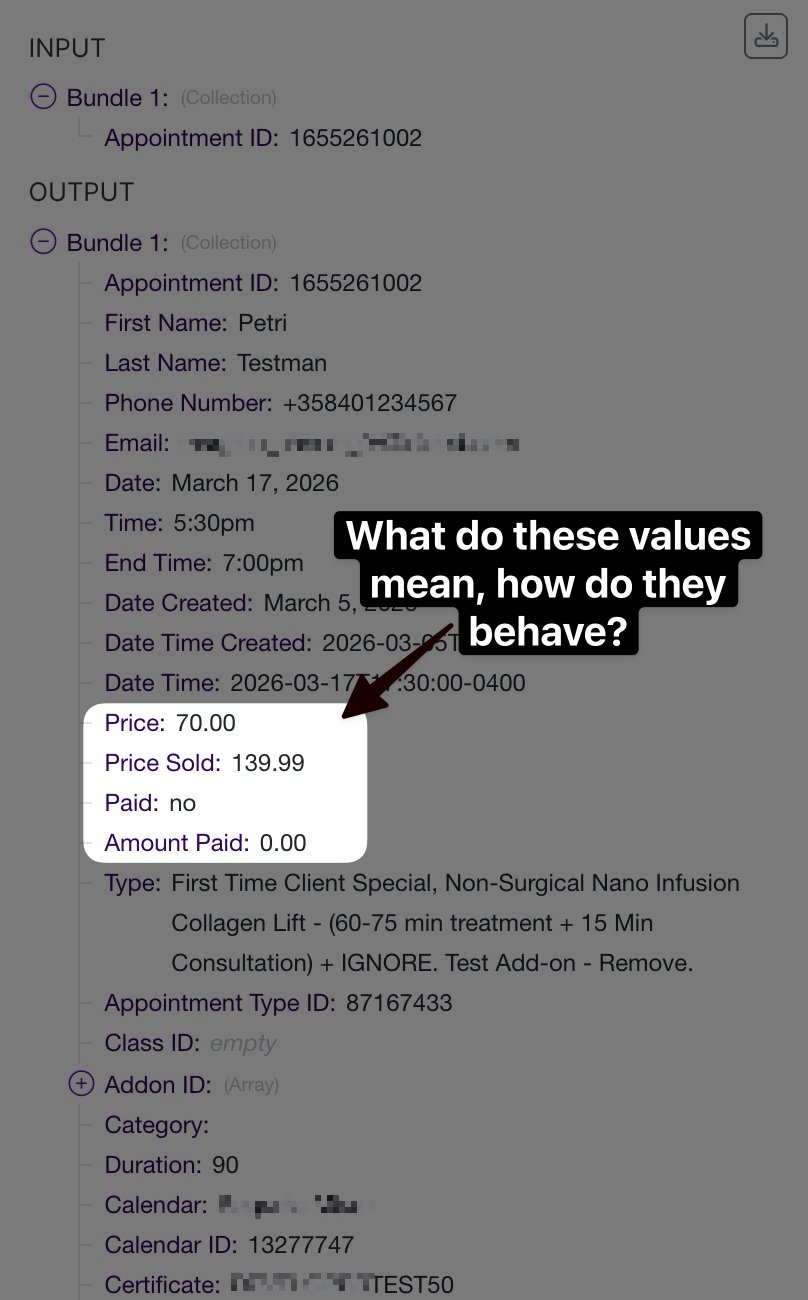
Below is the behavior verified in testing.
1. price
Definition
price represents the final appointment price after add-ons and discounts.
Importantly, this value does not depend on whether payment was processed through Acuity. It reflects the actual amount the client is expected to pay, regardless of where or how payment occurs.
This makes it the most reliable field for conversion value tracking when businesses accept payment:
- in person
- via card-on-file
- via another POS system
- outside Acuity entirely
Example
Service price: $129 spa treatment Add-on: $10 enhancement Discount: 50%
Calculation:
129 + 10 = 139
139 - 50% = 70
Result:
price = 70This represents the real transaction value of the appointment.
2. priceSold
Definition
priceSold represents the appointment price plus add-ons before discounts are applied.
This can be interpreted as the nominal sale value of the appointment if no promotional pricing were applied.
Example
Service price: $129 Add-on: $10 Discount: 50%
Calculation:
129 + 10 = 139Result:
priceSold = 139This field ignores discounts entirely.
3. amountPaid
Definition
amountPaid represents the amount of money actually collected through Acuity’s payment integrations.
This includes payments processed through:
- Stripe
- PayPal
- Square
If the booking workflow allows customers to reserve without paying, this value will frequently be:
amountPaid = 0even though the appointment itself still has value.
Example
Service price: $129 Add-on: $10 Customer selects “Reserve without paying”
Result:
amountPaid = 0For conversion tracking systems that rely on appointment value rather than payment processing, this field is usually not appropriate.
4. paid
Definition
paid is a boolean flag indicating whether Acuity recorded a payment.
Possible values:
yes
no
This field is not a numeric value and cannot be used directly in revenue calculations.
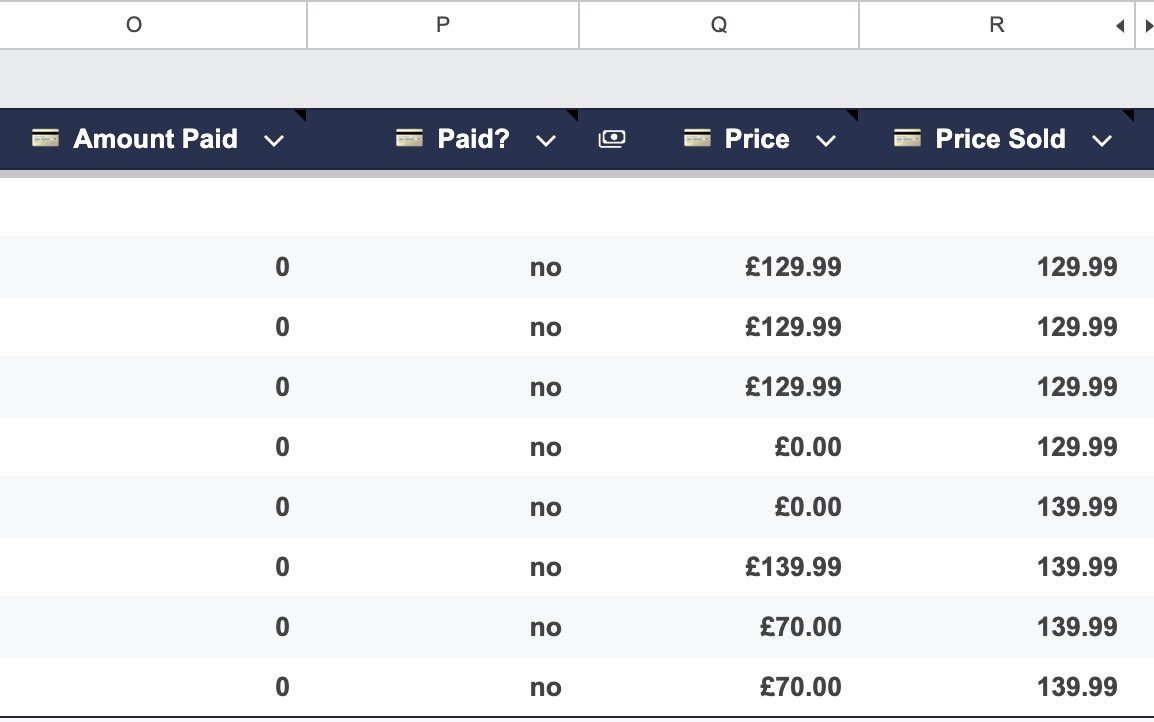
Tests conducted — Google Sheet logging as in the screenshot — to compare different scenarios, mixing together add-ons, payment methods, and discount coupons.
5. Front-End Tracking Behavior
When using Acuity’s standard front-end conversion tracking (Custom Conversion Tracking integration), the value sent for conversions corresponds to:
priceThis means the event value already reflects:
- add-ons
- discounts
- promotions
We cannot edit or modify this.
6. Meta Conversions API Implementation Notes
There are two typical implementation patterns.
Scenario 1 — Pixel + Conversions API (Recommended)
If you use both the Meta Pixel and the Meta Conversions API, events must be deduplicated.
This requires:
- identical event names
- identical values
- identical event IDs
A common strategy is to use:
event_id = appointment_idIn this scenario, the safest approach is:
value = priceUsing a different value server-side can cause event mismatch issues during deduplication.
Scenario 2 — Server-Side Only
If you skip the Meta Pixel and rely entirely on server-side tracking, you can calculate conversion value using any logic that fits your reporting model.
For example, you could use:
- price
- priceSold
- custom revenue calculations
- add-on revenue breakdown
- deposit tracking
Because there is no client-side deduplication constraint, the value can be derived freely from API data.
I have ran one test where I did the perfect conversions API with maximum parameters including click ID, user agent, IP address and more, but without using the Meta Pixel. The tracking was very high quality but I did see at least some extra conversions by using the hybrid method. More testing is needed to compare the conversion uplift. If we could use only Conversion API, everything would be significantly easier to implement, to manage, to understand and to be able to create complex filters like having a different appointment type name for different categories or filtering out unwanted conversions server-side.