
Circle.So Conversion Tracking - Sign-Ups
If you want to drive traffic to your Circle community, you need conversion tracking to measure if your ad clicks actually lead to new members.
Previously I’ve written about how to track Circle.So Paywalls, to track paying customers within Circle.
This week, a client asked me to track their entire Circle.so sign-up funnel for Meta. The idea again is, they want to use Meta Ads to drive new members.
Here are the basics on how to approach it. If you want it done for you, you can get in touch.
New Circle.so Tracking System Available
See the video demo of what perfect Circle.so conversion tracking system looks like.
Circle.so Cross-Domain Funnel
The first thing to consider, is that usually you have your website example.com. In main website, you probably have a button that goes to circle.so, for example https://login.circle.so/sign_up?….
So we have a cross-domain funnel.
Whenever we switch from one domain to another, we often lose the original ad click, tracking cookies and our attribution. Even if we send conversions from Circle correctly, our conversions may not show up.
The way to solve this depends on the platform.
Circle.so Google Ads cross-domain tracking
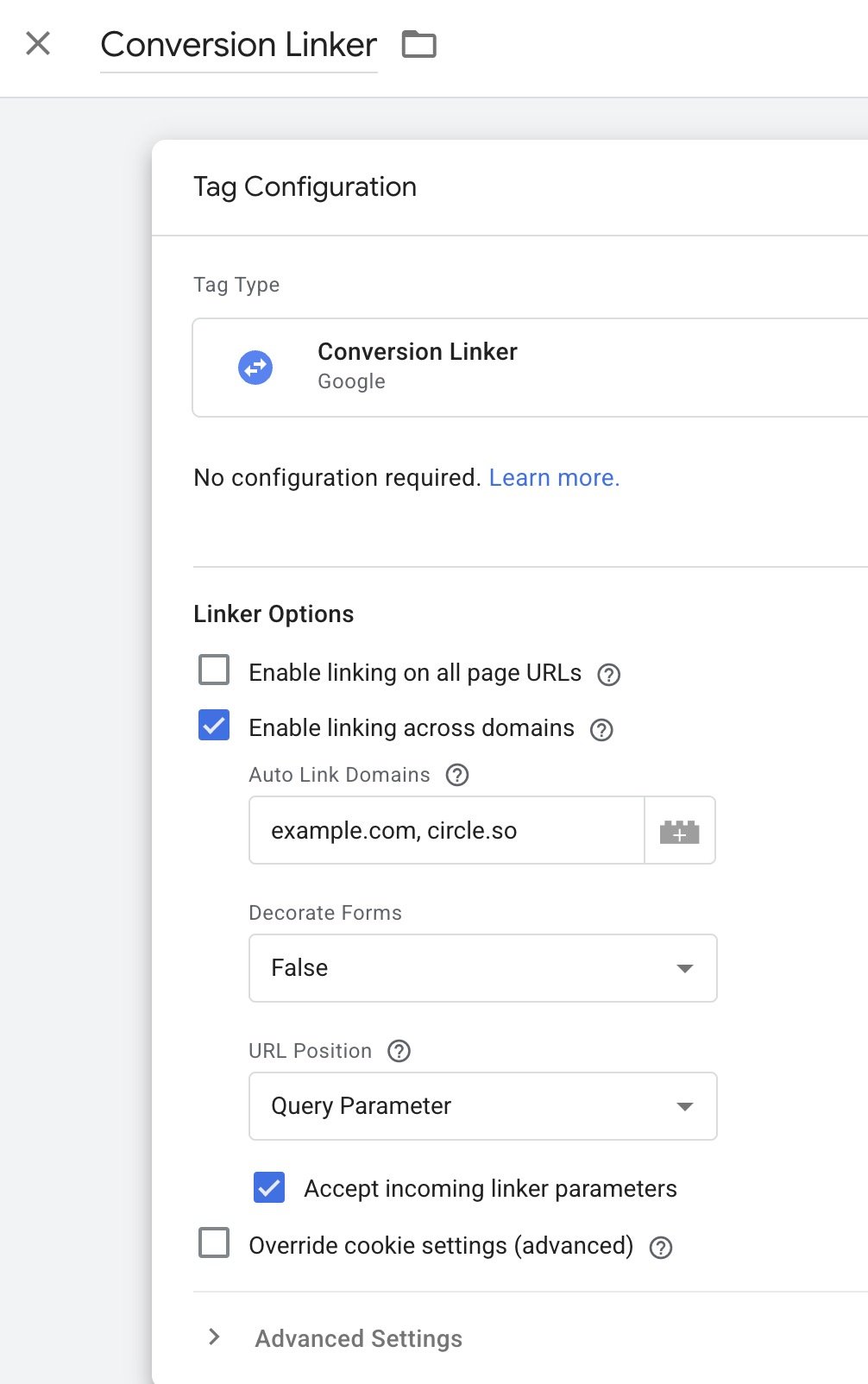
In Google Ads, we can use the Conversion Linker tag in Google Tag Manager, and click “Enable linking across domains”
Circle.so Google Analytics cross-domain tracking
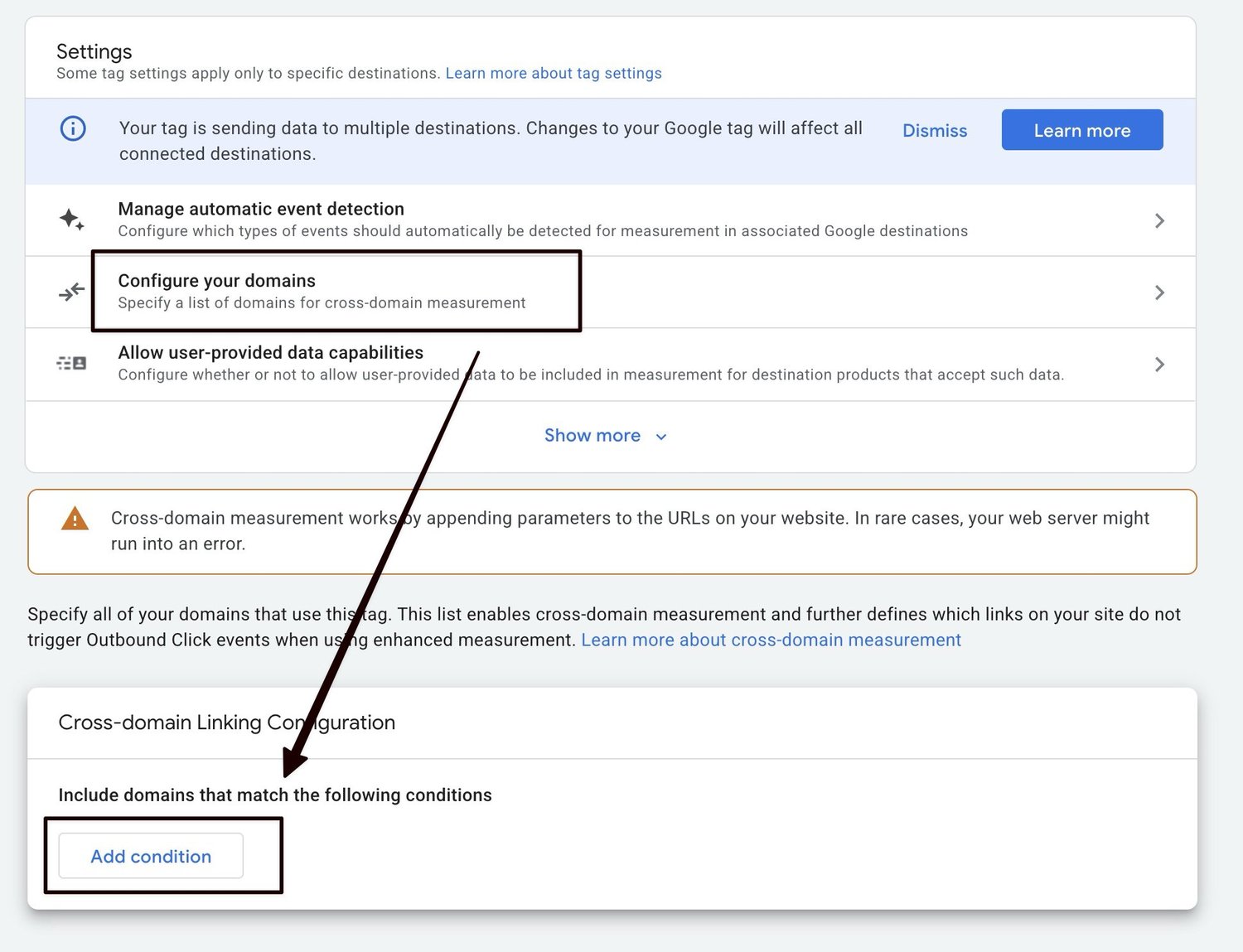
In Google Analytics, we can go to
Admin -> Data Collection and Modification -> Data Streams -> Stream -> Configure tag settings -> Configure your domains
Circle.so Meta / Facebook cross-domain tracking
Meta & Facebook is the most difficult one. It does not have an option like this.
We need a custom script that will add the facebook click ID into our outbound links.
<script>
(function() {
  var KEY = 'fbclid';
  // 1. Read fbclid from URL
  var params = new URLSearchParams(location.search);
  var fbclid = params.get('fbclid');
  // 2. Store if present and not already stored
  if (fbclid && !localStorage.getItem(KEY)) {
    localStorage.setItem(KEY, fbclid);
    console.log('fbclid stored:', fbclid);
  }
  document.addEventListener('DOMContentLoaded', function () {
    var stored = localStorage.getItem(KEY);
    if (!stored) return;
    document.querySelectorAll('a[href]').forEach(function(a) {
      var url;
      try { url = new URL(a.href); } catch(e) { return; }
      if (url.origin !== location.origin) {
        url.searchParams.set(KEY, stored);
        a.href = url.toString();
        console.log('fbclid added:', a.href);
      }
    });
  });
})();
</script>
Adding Google Tag Manager to Circle
Create a Google Tag Manager container.
Inside Circle, go to Site -> Code Snippets -> Head code snippets. Install GTM there.
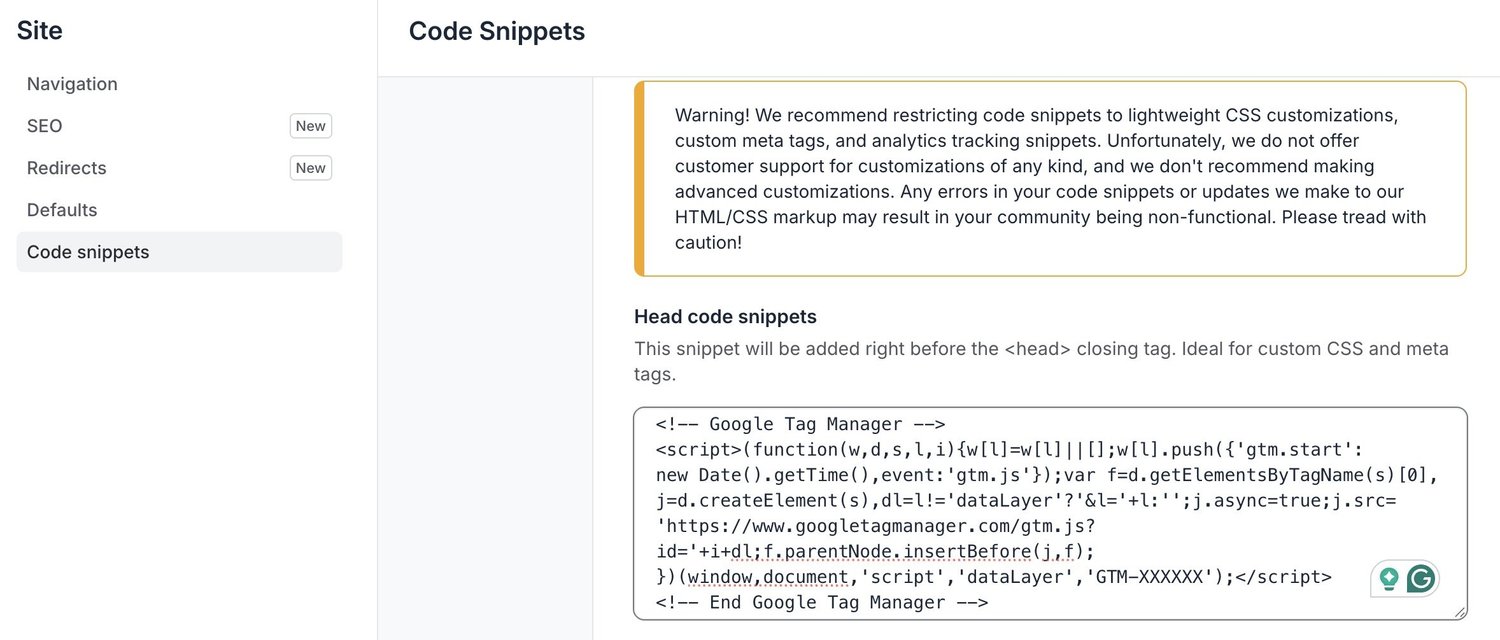
You can use the same GTM if you are careful, or have a separate one for your main website and Circle. Make sure you know what you’re doing.
Funnel steps and triggers
First page
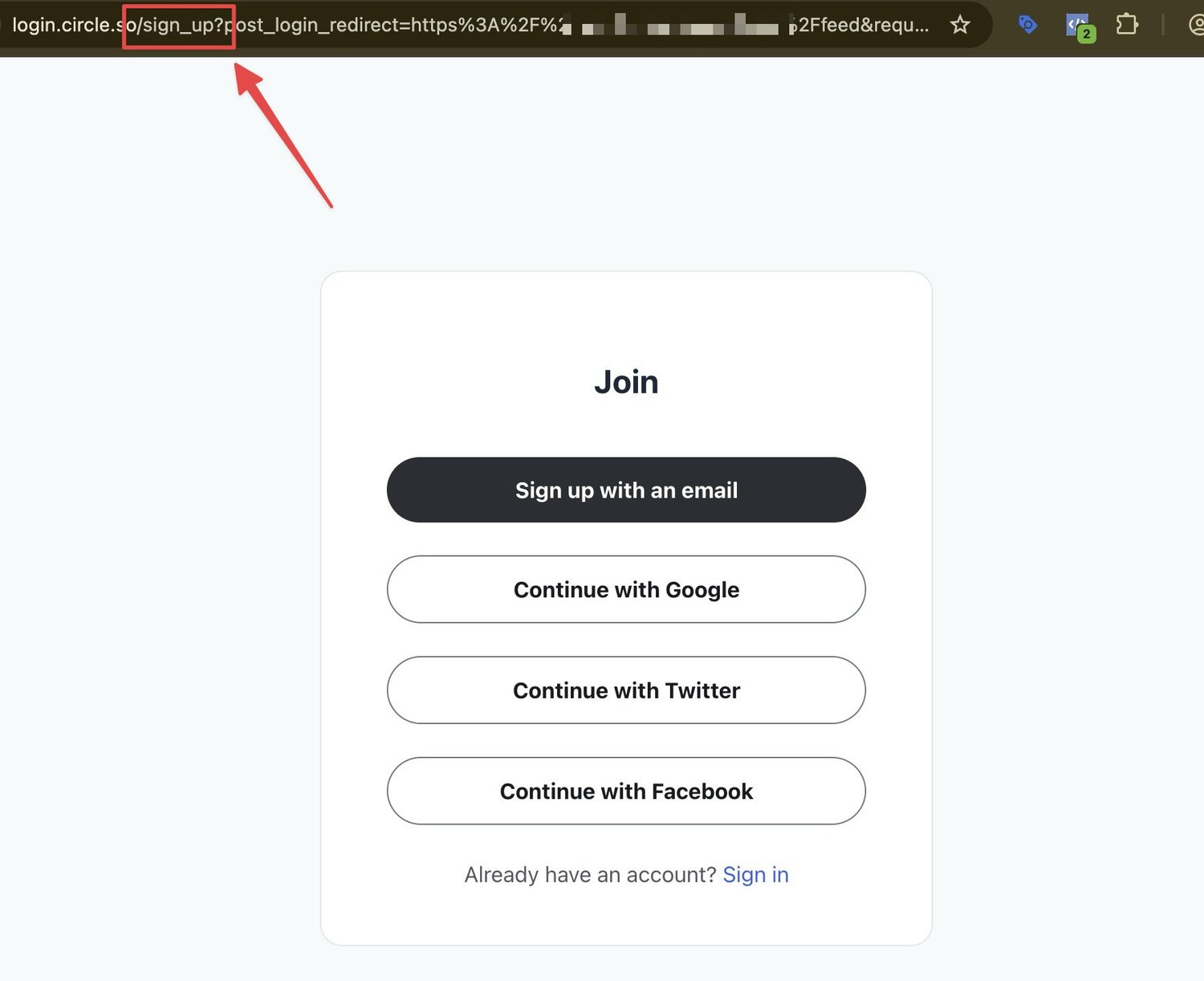
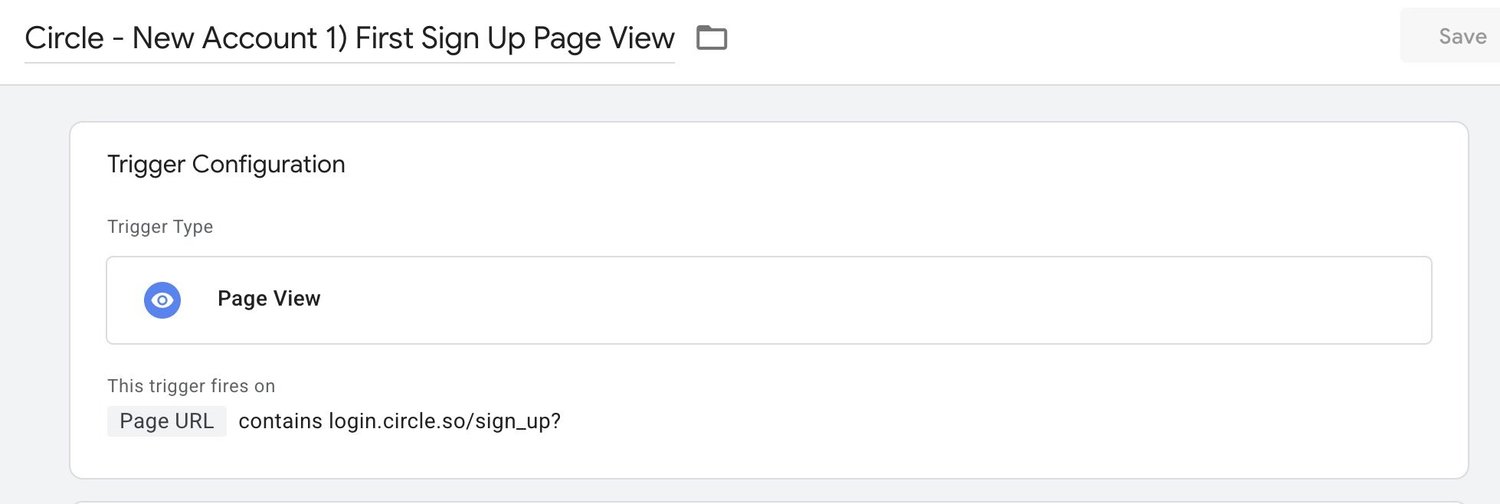
The first page of Circle sign up can be tracked by it’s URL.
So we can create a page view trigger like:
Page URL — contains — login.circle.so/sign_up?
Click to sign up
These are trickier. I’ll have to dig deeper. Each button has different details. Most basic triggers did not work properly. Needs more research.
Two Factor Auth Page
We can use {{Page Path}} - contains - two_fa”
Profile Created
Altough we want to track the entire funnel, this is most likely the important one. We can use a page view trigger.
{{Page URL}} - contains - /profile?new_state=true
Add Your Bio
After two factor auth and validaning the email, and creating an account, we have one more step. This is the page where we can add our bio, social media links, profile picture etc.
We can track this by a form submission on the same page (there is only one form with no ID so we pinpoint the exact conversion by the combination)
{{Page URL}} - contains - /profile?new_state=true
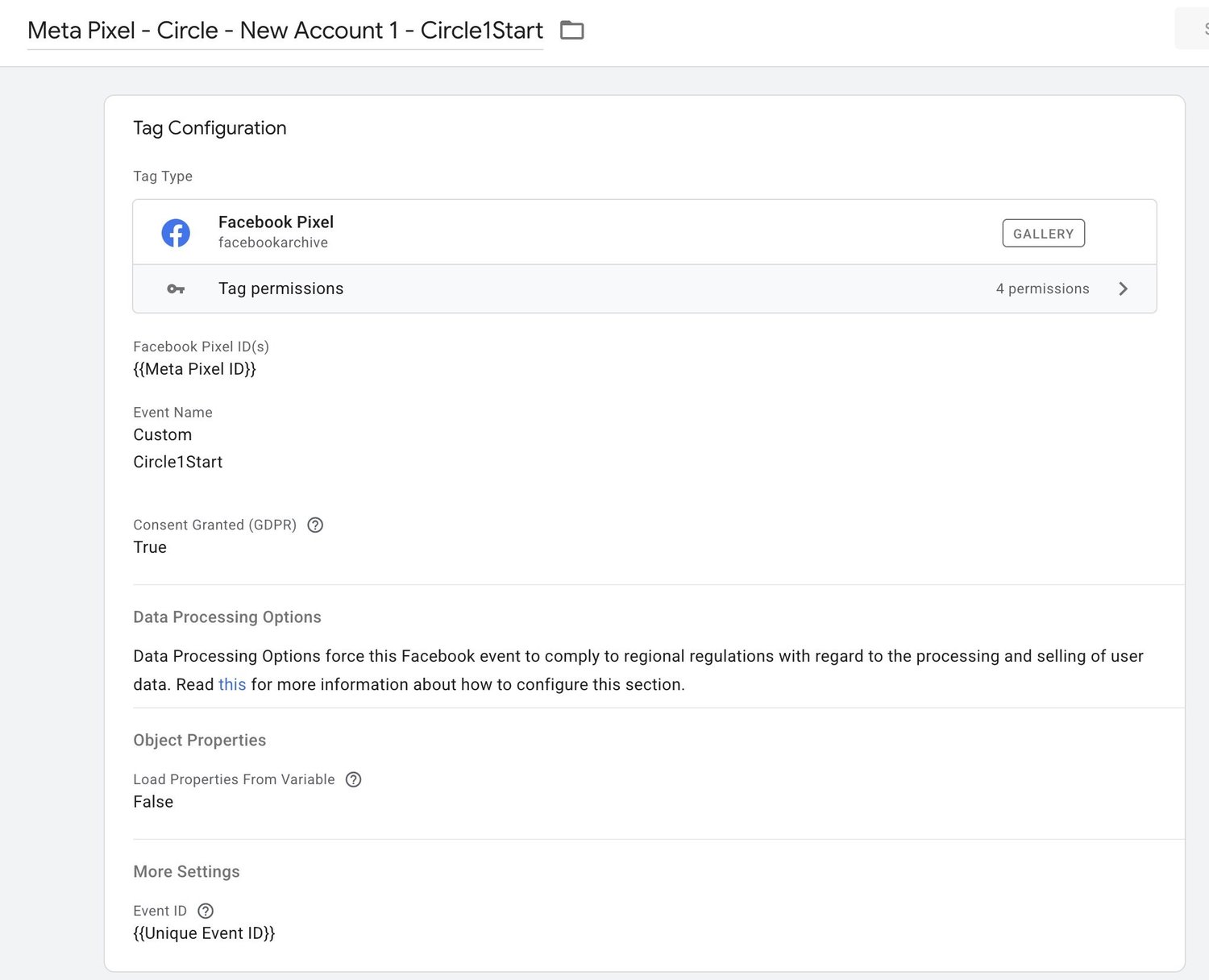
Next, add your conversion tracking tags like Google Analytics funnel events, Meta Pixel events and Google Ads conversions. Example for the first tag, using the Facebook Pixel template in Google Tag Manager.
Important details
For Meta, the Meta Pixel is not enough. We need conversions API as well. With only the Pixel, your ads will usually lose 30-50% of conversions. Algorithm is shooting blind, so your ads won’t work.
For this, there are tons of solutions like Tracklution, Stape, make.com or my custom tracking app I’ve developed and can install for you.
For Meta Pixel + CAPI, we need a unique ID for deduplication. Stape has a nice Google Tag Manager variable template called Unique Event ID which can be used for both the Pixel, and a custom javascript webhook to our CAPI server.
function sendMakeCEvent(event, value) {
  fetch("https://hook.eu1.make.com/xxxx", {
    method: "POST",
    headers: { "Content-Type": "application/json" },
    body: JSON.stringify({
      event,
      value,
      user_agent: navigator.userAgent,
      fbp: (document.cookie.match(/_fbp=([^;]+)/)||[])[1]||"",
      fbc: (document.cookie.match(/_fbc=([^;]+)/)||[])[1]||"",
      url: window.location.href,
      url_noparams: window.location.origin + window.location.pathname
    }),
  })
  .then(response => {
    if (!response.ok) {
      // Log a warning if the endpoint is unavailable or returns an error status
      console.warn(
        'sendMakeCEvent: Fetch failed with HTTP status ' + response.status + '. Possible CORS issue or endpoint unavailable.'
      );
    }
    return response;
  })
  .catch(error => {
    // Log fetch/network/CORS errors but do not throw
    console.error(
      "sendMakeCEvent: Could not POST event. This may be due to CORS or a network error:",
      error
    );
  });
}
Google Ads Enhanced Conversion Tracking & Meta Pixel Advanced Matching
This one is trickier in Circle. If your customers use their manual email address, we can make a little hack to keep track or what they write in the email field. Store it as a cookie or local storage.
Then have a custom javascript or first-party cookie variable in Google Tag Manager to improve conversion accuracy.
// keep track of email input for signup — only for manual email, not for Google/Meta/Twitter auth
(function() {
  const selector = 'input[name="user[email]"][type="email"][data-testid="user_email"]';
  function updateLocalStorageOnInput(inputEl) {
    if (!inputEl) {
      console.warn('Email input not found for tracking.');
      return;
    }
    let lastValue = inputEl.value || '';
    // Initial set if not yet set
    if (lastValue && window.localStorage.getItem('circle_signup_email') !== lastValue) {
      window.localStorage.setItem('circle_signup_email', lastValue);
      console.log('circle_signup_email updated:', lastValue);
    }
    inputEl.addEventListener('input', function(e) {
      const value = inputEl.value;
      if (value !== lastValue) {
        lastValue = value;
        window.localStorage.setItem('circle_signup_email', value);
        console.log('circle_signup_email updated:', value);
      }
    });
  }
  function tryFindInput(retryCount = 0) {    const inputEl = document.querySelector(selector);
    if (inputEl) {
      updateLocalStorageOnInput(inputEl);
    } else if (retryCount < 20) {
      setTimeout(() => tryFindInput(retryCount + 1), 400);
    } else {
      console.warn('Failed to find email input for tracking after several attempts.');
    }
  }
  tryFindInput();
})();
Need help?
If you want your ads to have the most accurate conversion data, to optimise campaign performance, you can get in touch and I can install and maintain my new Circle conversion tracking app for you. Zero hassle. Clarity in your data. Peace of mind.