
Facebook Offline Conversion Tracking: Guide 2025 (Setup, Secrets, and Real-World Examples)
Meta / Facebook offline conversion tracking is difficult and complex. Let’s make it easier.
I recently implemented the Facebook / Meta offline conversion tracking setup for a client of mine in the solar panel industry. It was one of the most difficult setups I’ve done.
I will update this article as new information and findings come up. But I will start by sharing a short version of what I wish I had known before I had to spend weeks or research and testing.
Here we go.
Why You Need Offline Conversion Tracking For Meta?
Short answer:
Facebook offline conversion tracking (when done right) will make you so much more money, your banker will call you to say their computers run out of space in their hard drives.
How does offline conversion tracking achieve the highest ROAS possible? Well, the best digital marketer I’ve ever worked with keeps repeating the same thing. Over and over again. It’s this:
“Keep your conversions close to the money”.
What does this mean?
-
If you “Contact Us” button clicks as conversions, you track a tiny bit of intent. But most won’t submit your contact form.
-
If you track your contact form submissions, you are closer to the money. But some are junk. Some are bots. Some are not qualified. Some may even be trying to sell you something. But it’s better than the “Contact Us” Click
-
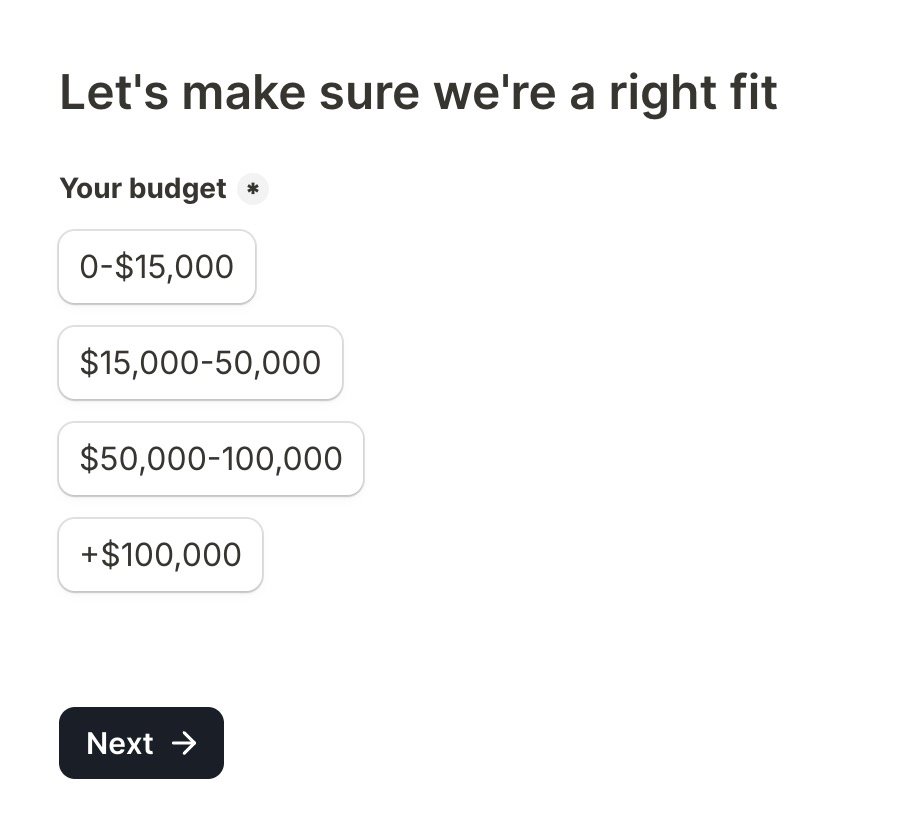
If you have a qualifying question in your contact form, for example you ask for their budget. If we only send conversions for the leads that have high enough budget, we are again closer to the money.
-
But once we go past online (website) conversions, into offline conversions (real world interactions), and we tell Meta about what happens after they submit the form, we are step closer to the money. For exmple, we call the lead, and book an appointment.
-
If the client buys a solar panel, and we tell Meta algorithm “This click lead to an actual purchase of $25,000”.
We are as close to the money as possible.
The same principle applies for purchases at your physical store. You don’t care as much about an add-to-cart event, as you do about a purchase.
If we share this super valuable information with Meta algorithm, it will learn what type of people and which clicks lead to actual qualified paying customers. And it can focus on finding those.
Meta can’t see your real sales without offline conversion tracking. When you feed those sales back to Meta, the algorithm starts targeting people who actually buy.
This means fewer junk leads, lower costs, and more revenue from the same ad spend.
Facebook Offline Conversions API is Deprecated
Check the Facebook docs, ThThe Offline Conversions API will be discontinued on May 14, 2025.
“Conversions API now fully supports offline events. Advertisers with existing Offline Conversions API integrations must convert their integration into a Conversions API integration before May 14, 2025 to avoid disruption”
What this means is, we will use the new Meta Conversions API for our offline conversions.
The biggest “problem” this causes, is that ChatGPT, Claude and others will provide outdated information that only applies to the old Offline Conversions API. ChatGPT will lead you running in circles doing weird stuff.
Facebook Offline Conversions Are Done via ‘Meta Conversions API’
The short version is, you will send conversions to Meta, using the new Conversions API. There is no longer a separate API for offline conversions.
This I think is nice and makes things clearer.
If you set up Meta Conversions API (CAPI) for your website conversions, you can usually re-use a lot of the same code, or the same automations for your offline conversions.
So, if you’re solved the unique quirks of Meta Conversions API, like the Facebook Click ID (fbclid, or _fbc cookie) formatting, creating filters for IP address and user agent -combos, normalising and formatting your data (for example the phone number is a different version of e.164 international format than Google Ads API uses! — make sure to get it right) you.
Not n8n. Not Zapier. Use make.com.
I’m personally team make.com.
I’ve used Zapier, but kept running into things it could not do. When I switched to make.com, I became happier and started saving money.
For a long time I felt each automation tool had some unique advantage.
N8N could do custom Javascript.
Make.com had cheaper prices and best UI. And a great phone number formatting module which is super useful for Facebook Conversions API. I would dread doing it manually with N8N.
Zapier was simplest, but also had a few aces up its sleeve. I believe Google Sheet triggers are less of hassle there.
But when it comes to Meta Conversions API, I believe make.com is the winner.
- N8n does not have Meta CAPI module, officially at least. Http module is a hassle.
- You’d need to hash stuff manually. No point.
- N8N does not have the absolutely lovely phone number formatter
- Zapier feels like a toy for kids, for Meta CAPI. It does not have a field for meta click Id’s, Meta pixel cookies, or test event codes. Sure, you can do it via Additional Data, but considering it’s usually much more expensive I don’t really see a point.
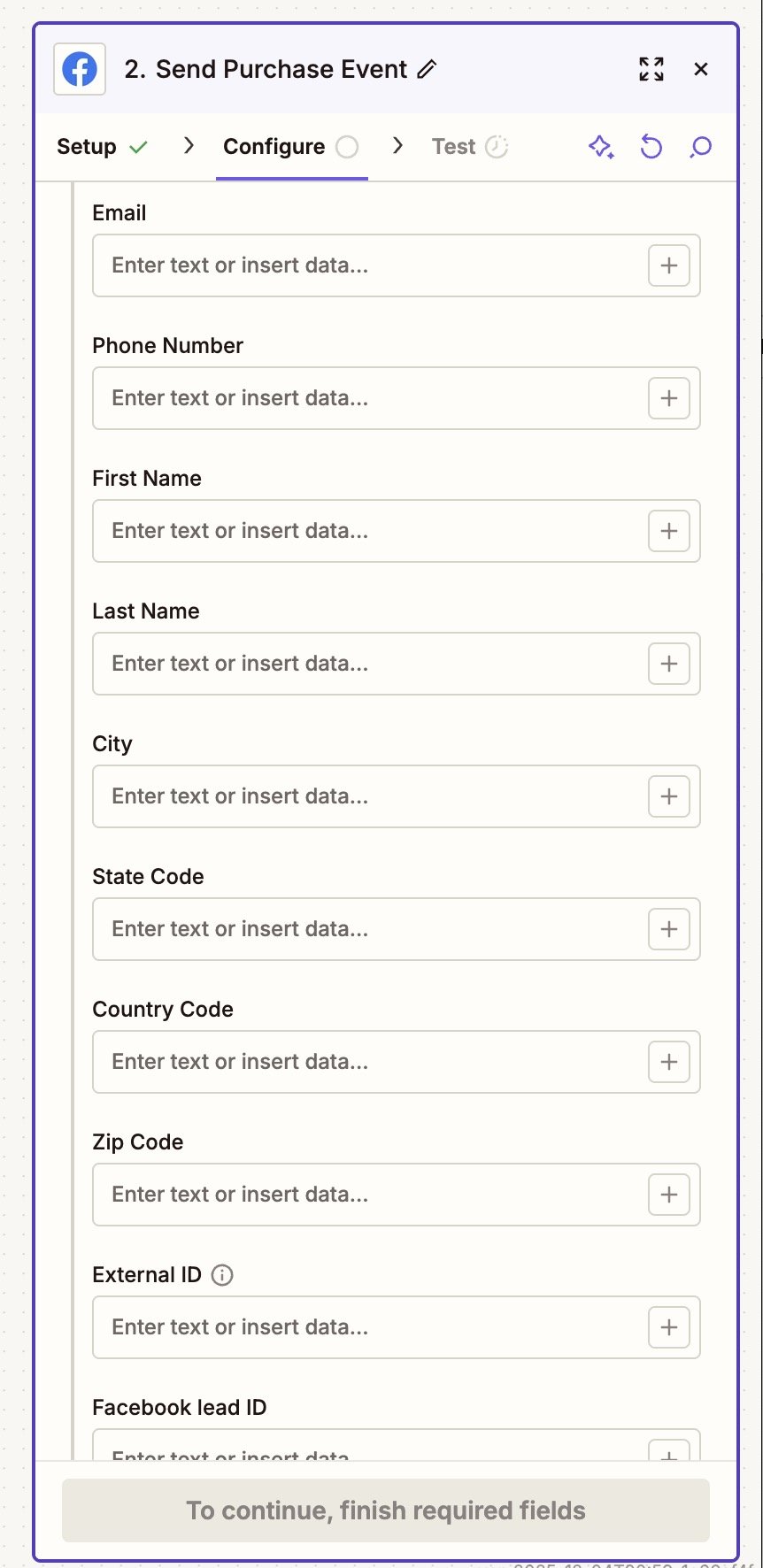
Zapier Meta Conversions API module is missing click ID’s, facebook pixel cookies, and test events.
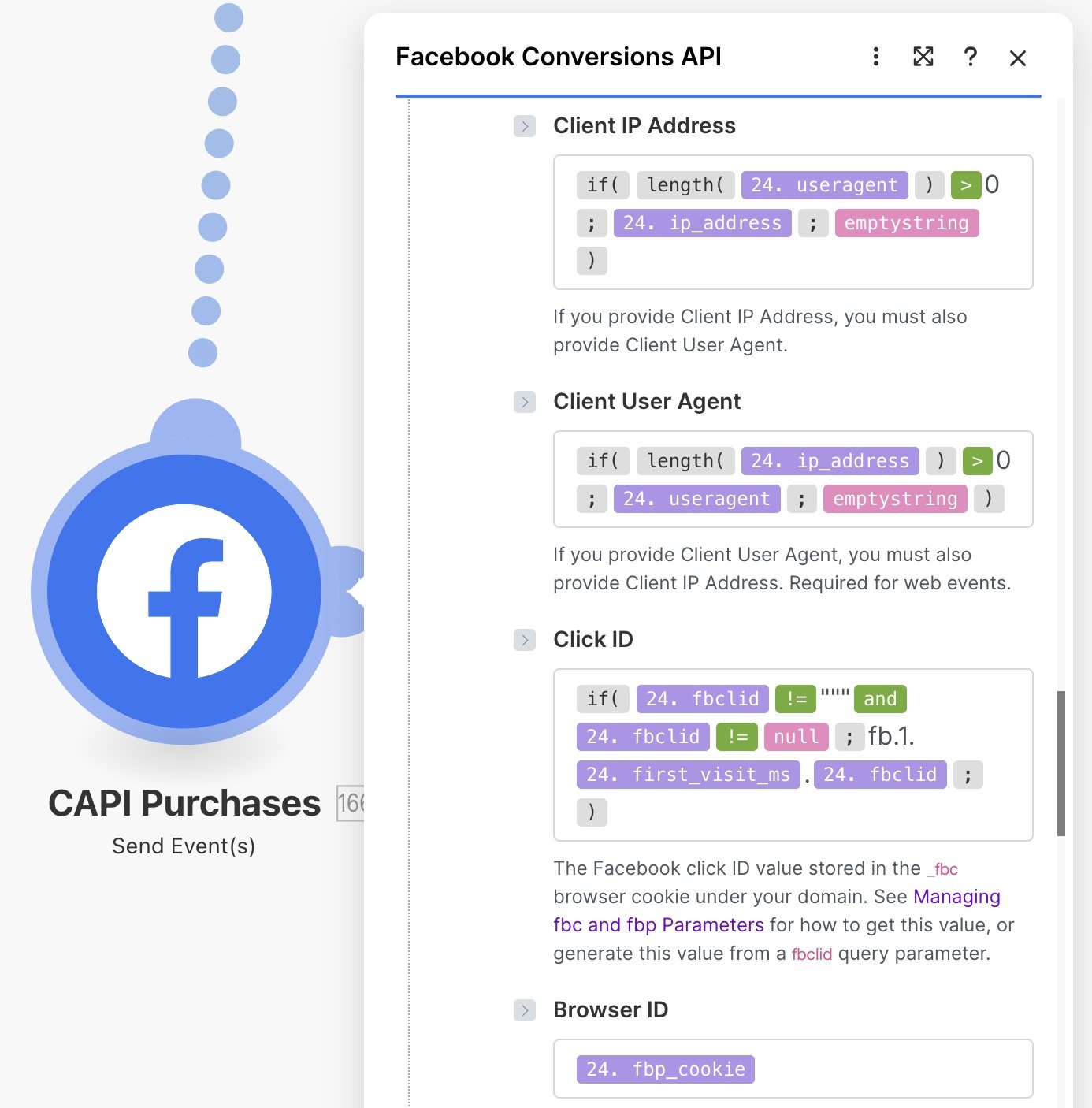
Make.com Facebook conversions API module has everything we need, including:
- client IP address
- user agent
- Facebook click ID.
- Test event code (for online CAPI)
You don’t need a separate offline data set…
Part of the upgrade Meta did, was combine conversions into one API. Conversions API for online conversions and offline conversions. And the incoming data, Pixels and Offline Data Sets, into data sets that can take in both.
This makes things simpler. But again, confuses ChatGPT, wastes your time.
So, if you have you data set for your Facebook / Meta Pixel, you can just send your offline conversions there.
However, I’m not sure if it’s still useful to create a separate data set for offline. So far, I have not ran into a problem just using the same Meta “Pixel” (or a data set) for online and offline events.
It seems that on Dec 2025, Meta does not want you to create separate Offline Data Set. Offline *“Connect activity that occurs offline, including phone calls or in-store purchases.” *-option is greyed out. See Screenshot below.
Let me know if there is a reason for a separate data set. Some people online
Enable “Auto-Tracking”
This is the big one. I found very little information about this. But it’s perhaps the #1 I’d tell myself if I had a time machine. Save me many sleepless nights.
With offline conversions, you need to connect the offline data to your ads. Not sure why. Perhaps this is some legacy crap from when Facebook used the Offline Conversions API that’s not disappering.
- Go to Meta Business Manager
- Head over to Events Manager
- Click Data Sets
- Pick your Data Set (Pixel)
- Go to Settings
- Scroll down
- Enable Auto Tracking
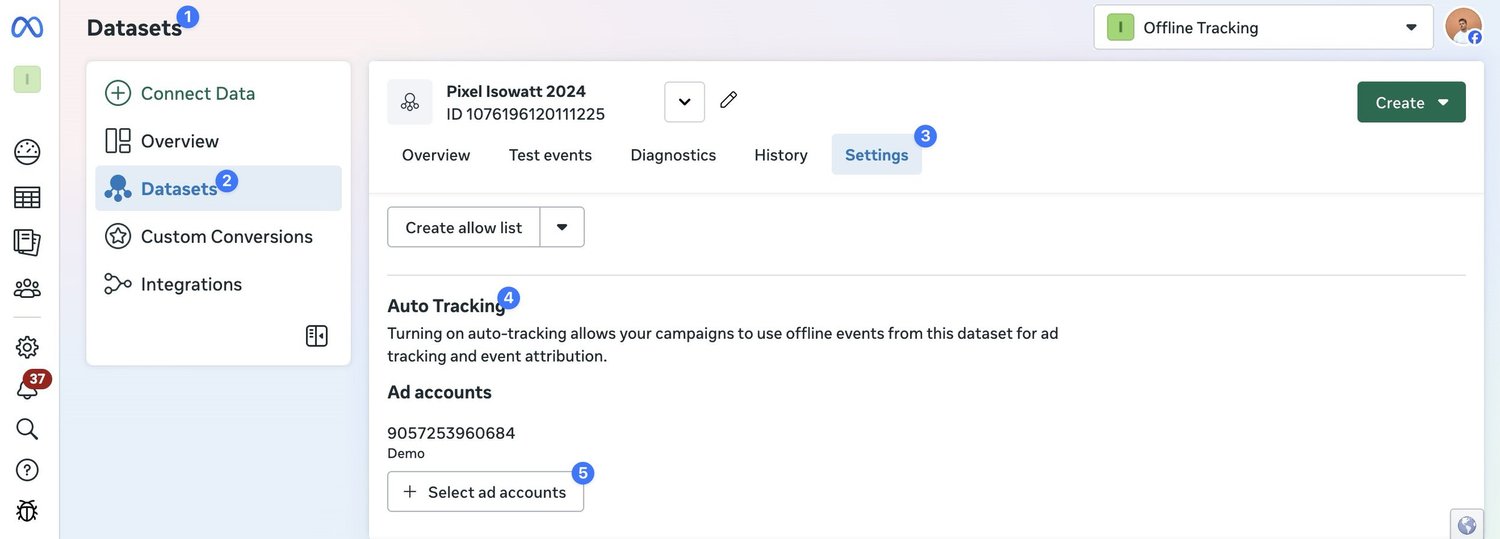
The part that is still unclear, is do you need to re-create (duplicate and clone) your old ads for this to work.
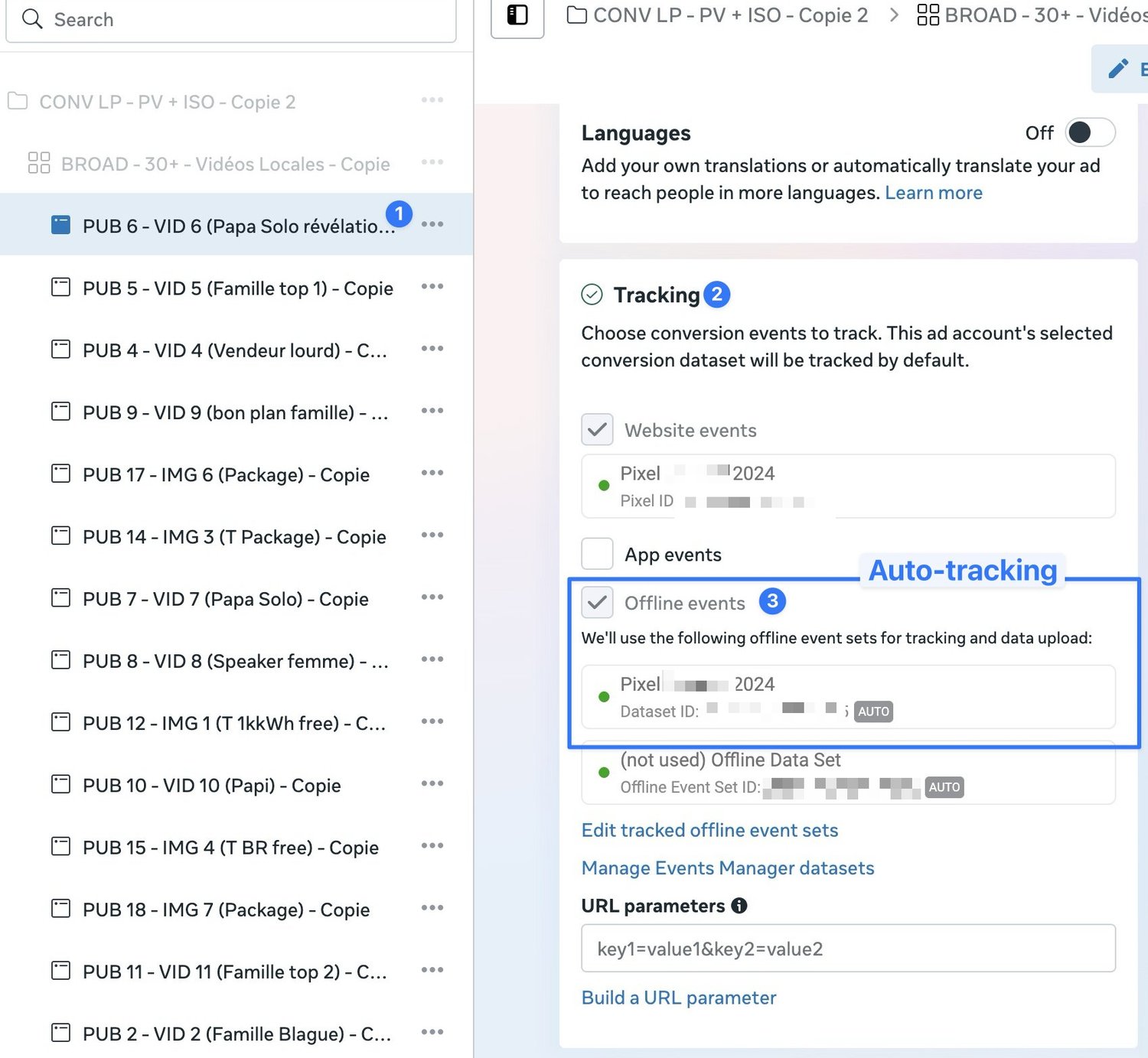
All the information I found was outdated and conflicting. But in my testing, it seemed that some campaigns were not receiving the offline conversion data, but some campaigns were. It was clearly related to the auto-tracking feature. Many sources said that once you enable auto-tracking, you need to then recreate ad campaigns. And only these new campaigns can start collecting offline conversions after auto-tracking is enabled.
I will update once I get more data. But safest bet is to enable auto-tracking, and re-create ad campaigns.
You can check the status of your offline conversions, if they’re connected to your Meta ads, under Ads→ Tracking→ Offline events
Customer Information Parameters
The difference between Google Ads and Meta Ads offline conversion tracking is that Google Ads mainly relies on just one parameter, the Google Click ID or GCLID. If you have the G-glid, you can send offline conversions. If you don’t, you can’t (Now Google offers ‘enhanced conversions for leadsä, but it’s a terrible method and you should never use it).
Meta Ads on the other hand will take any information you can provide. First name, last name, phone number, email address, IP address, user agent, which is the browser and the operating system, Facebook Click ID, Facebook Pixel Cookie, Country, State, ZIP Code…
The more information you can share with Meta, the higher likelihood there is that your offline conversions will be attributed to the correct person and the correct ad.
This is what distinguishes crap offline conversion tracking from amazing offline conversion tracking. Usually things like email address, first name, last name are pretty easy to come by. IP address, click ID, user agent on the other hand are much more difficult.
Facebook Click ID
It is absolutely crucial you store the Facebook Click ID’s in your browsers. Ideally using methods that ad blockers or Apple Intelligent Tracking Prevention will not block. And that you pass the Facebook click ID into your contact forms, conversions, CRM. You also need the UNIX timestamp.
This is absolutely crucial! Without reliably passing Facebook click ID’s into your system, the rest of the stuff won’t save you. You risk losing a huge % of your offline conversions. Get in touch if you need help with this part. It’s the trickiest, as it’s very platform specific.
Typeform, Acuity, Calendly, Tally, Jotform etc. require creative javascript based solutions. GoHighLevel forms store it automatically BUT they lack the unix timestamp. Offline conversions may work with a timestamp that doesn’t match perfectly (I have not tested but I believe it’s the case) but I would still pass it through to be sure. Hubspot Forms are trickiest because we usually can’t generate them with dynamic JavaScript, or pass custom parameters to hidden fields. There is a Hubspot form iFrame method through parent page url-inheritance, but it’s very complex.
Formatting the Facebook click ID
Formatting the Facebook click ID is unfortunately a total pain in the ass. Where Google Ads takes the Google Ads click ID as it is, MetaAds requires you to parse together a string with a Unix timestamp of the first visit. Check for details here.
In make.com, I format fbclid into _fbc format like this
Make sure you format your phone number correctly because again the format is different than most APIs or Google Ads. Facebook uses the same E164 international standard phone number format but without the plus international prefix. This is very important because the information is hashed so meta cannot fix a bad format in their end. It is possible that make.com is smart enough to strip the plus but I don’t see it and it’s better to be safe than sorry.
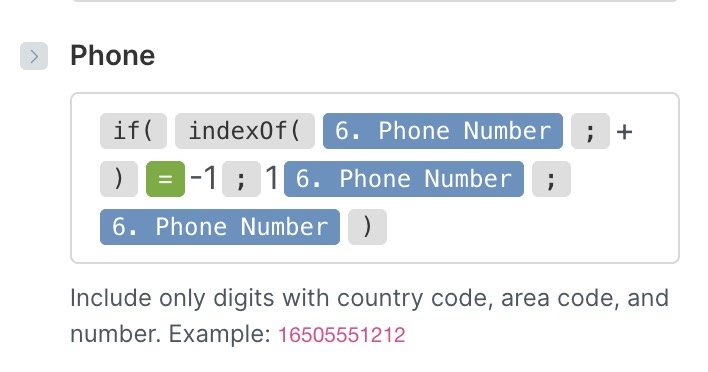
For names etc, keep them lowercase.
Testing & Debugging
I recommend running tests with a manual trigger, even just copy-pasting a few users into make.com.
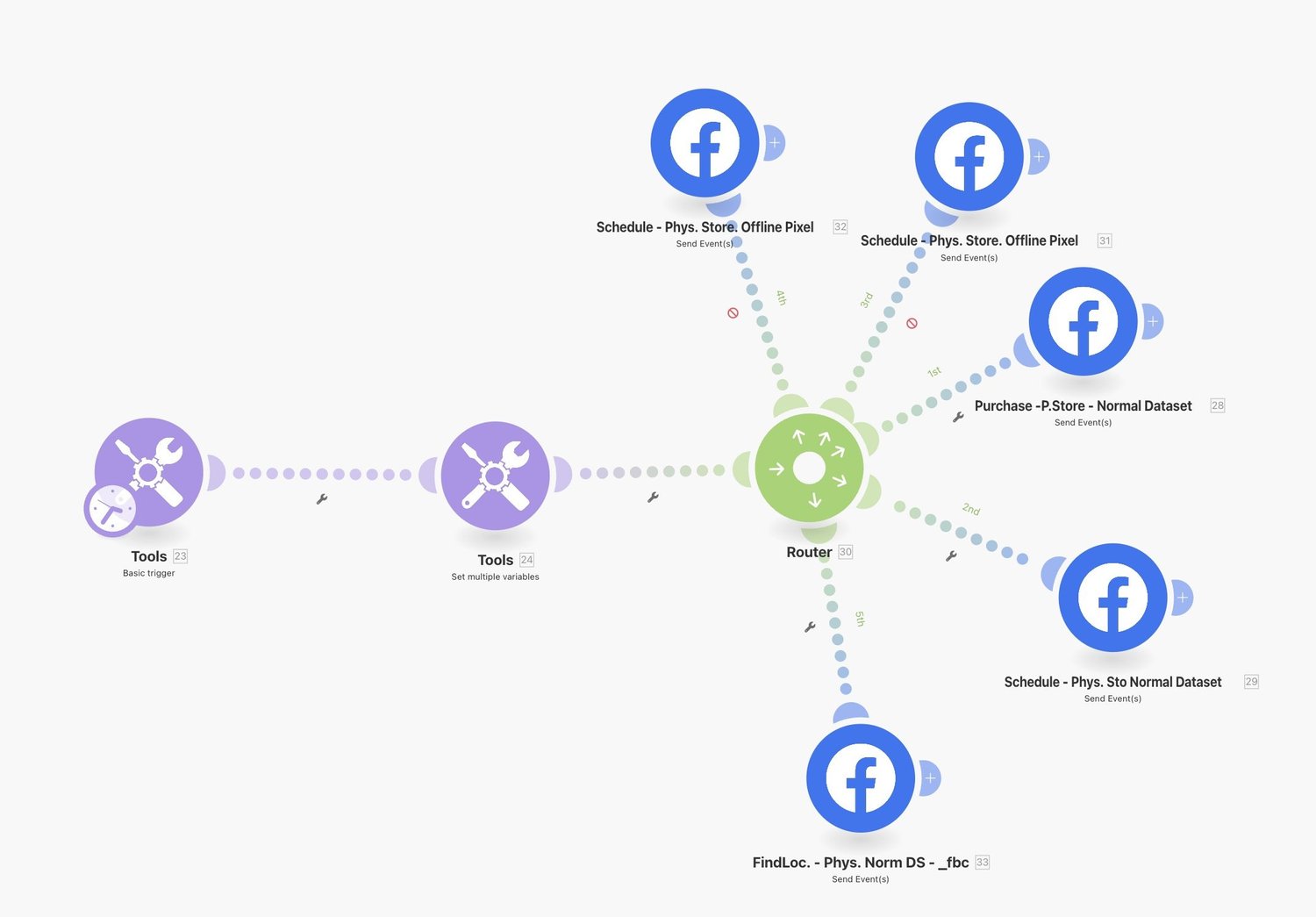
For me, before I glue CRM’s, Google Sheets, Typeform etc. together in an slick automated way, I wanna be absolutely sure I will be seeing actual offline conversions in my Meta ads dashboard.
So until I can see this with my own eyes
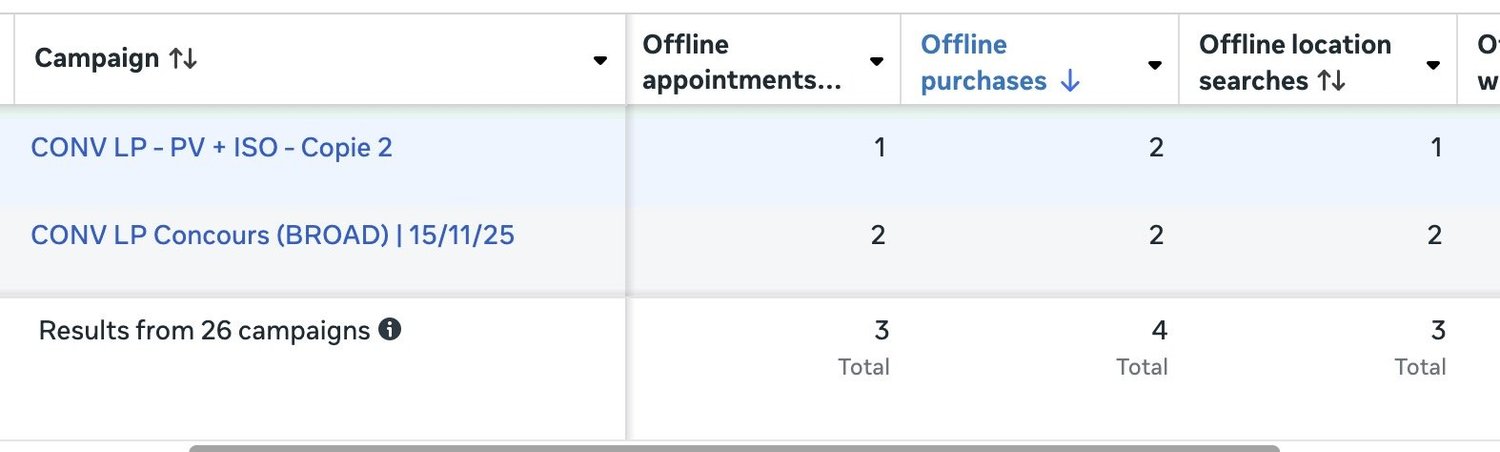
…I won’t be risking creating a fancy setup that won’t generate results.
Test events does not work for Offline conversions
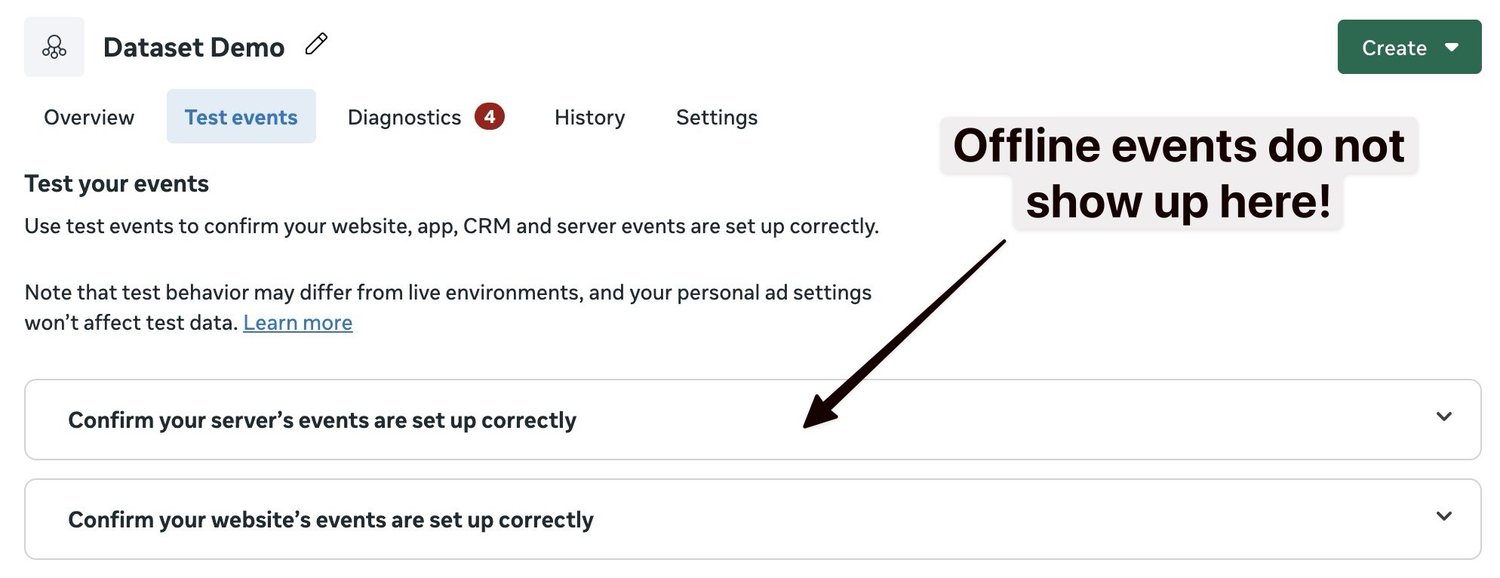
This cost me 2 days of headaches. Hopefully I can save you from it. Facebook offline conversions physical store, calls etc do not show up in the dataset test events view like website events do.
I hate this… makes testing super annoying and slow. I have not found the perfect method. For now, I send events, wait. Hope to see them in the Dataset Overview -view. Test again, repeat.
Get real conversions (may be difficult) and test sending those. See if they show up in ads. Annoyingly this will cause some fake conversions in your reports when setting things up.
One creative workaround I came up with, was to use a unique identifier like a time someone converted (say it’s 08:46) as the value of your conversions, when testing. This way, if some conversions came through and others don’t, you can see which is which.
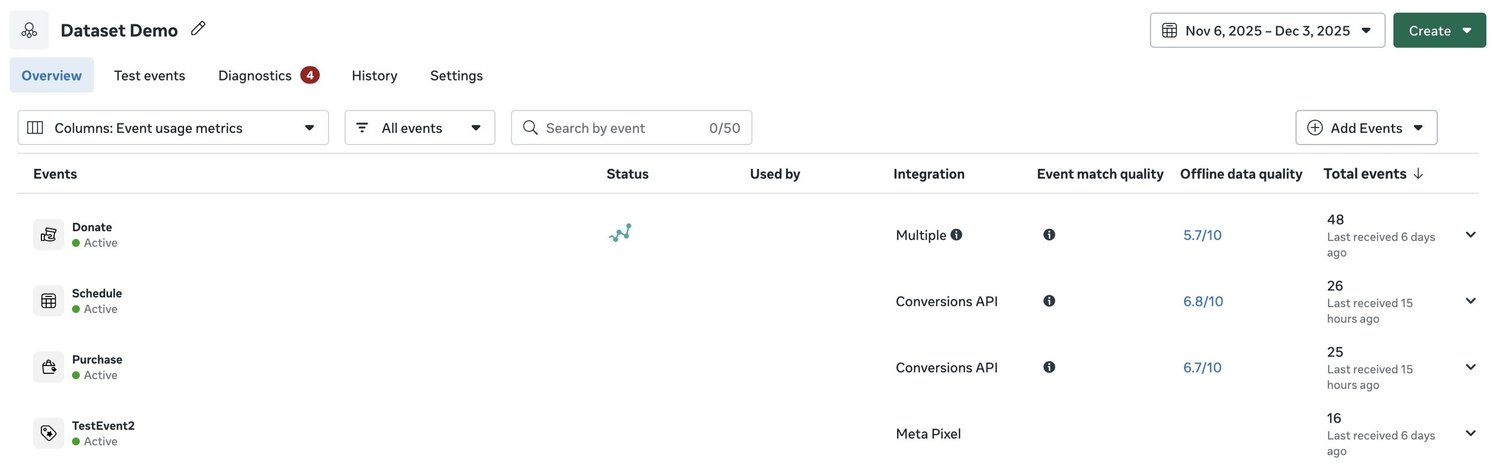
If things go well, in a few days your Dataset overview shows a new column Next to the **Event match quality, **and you also start seeing Offline data quality
Consider Using a ‘Purchase’ Event
Even if the offline conversion isn’t a purchase. If it is a Purchase, you’ll of course pick it.
This workaround will depend heavily on how you structure your conversions and your campaigns. One thought I had was to consider using an offline purchase event, even if the conversion isn’t actually a purchase. Let’s say that we are doing a lead generation campaign, for example, and the offline conversion is an appointment that’s booked. Now, if we want to optimize our campaigns for both the online event and the offline event, and perhaps use different conversion values where the form submission gets 10 points and maybe a booked appointment gets 100 points, for example. We can only do this with the purchase event (as far as I know).
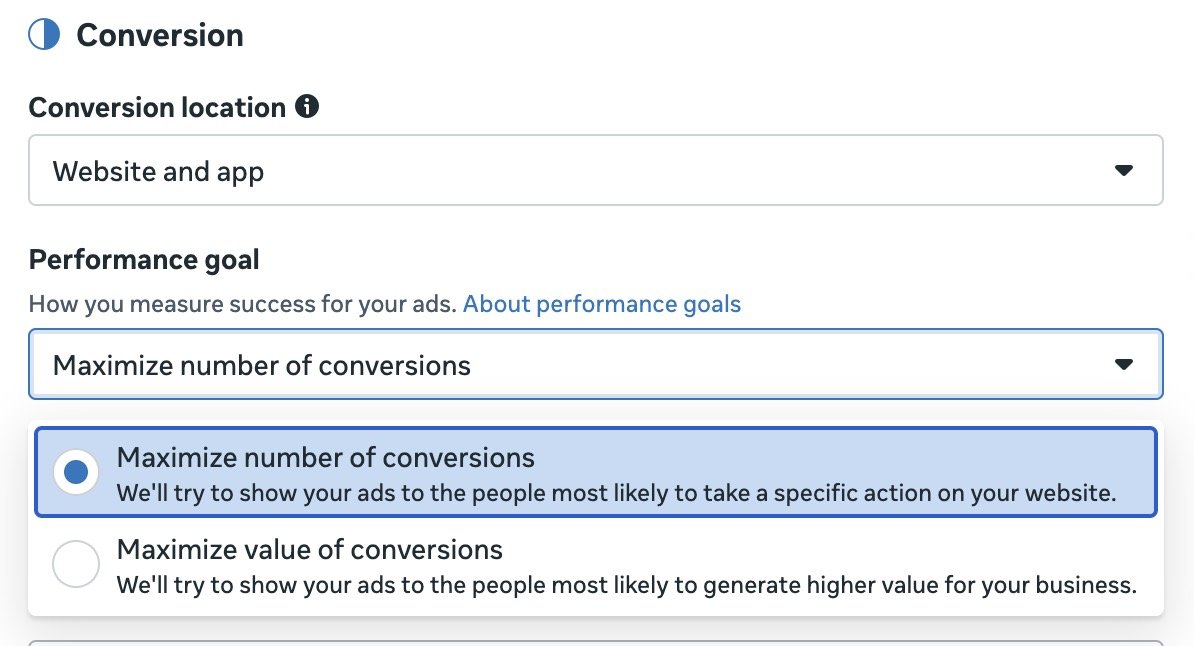
The maximize conversion value bidding strategy is usually the most effective for making tons of money. So with the purchase event we get the benefit of having combo goal of online and offline, as well as being able to attribute values to let the algorithm know that
We like 💁♂️ form submissions.
But we love ❤️ actual paying customers.
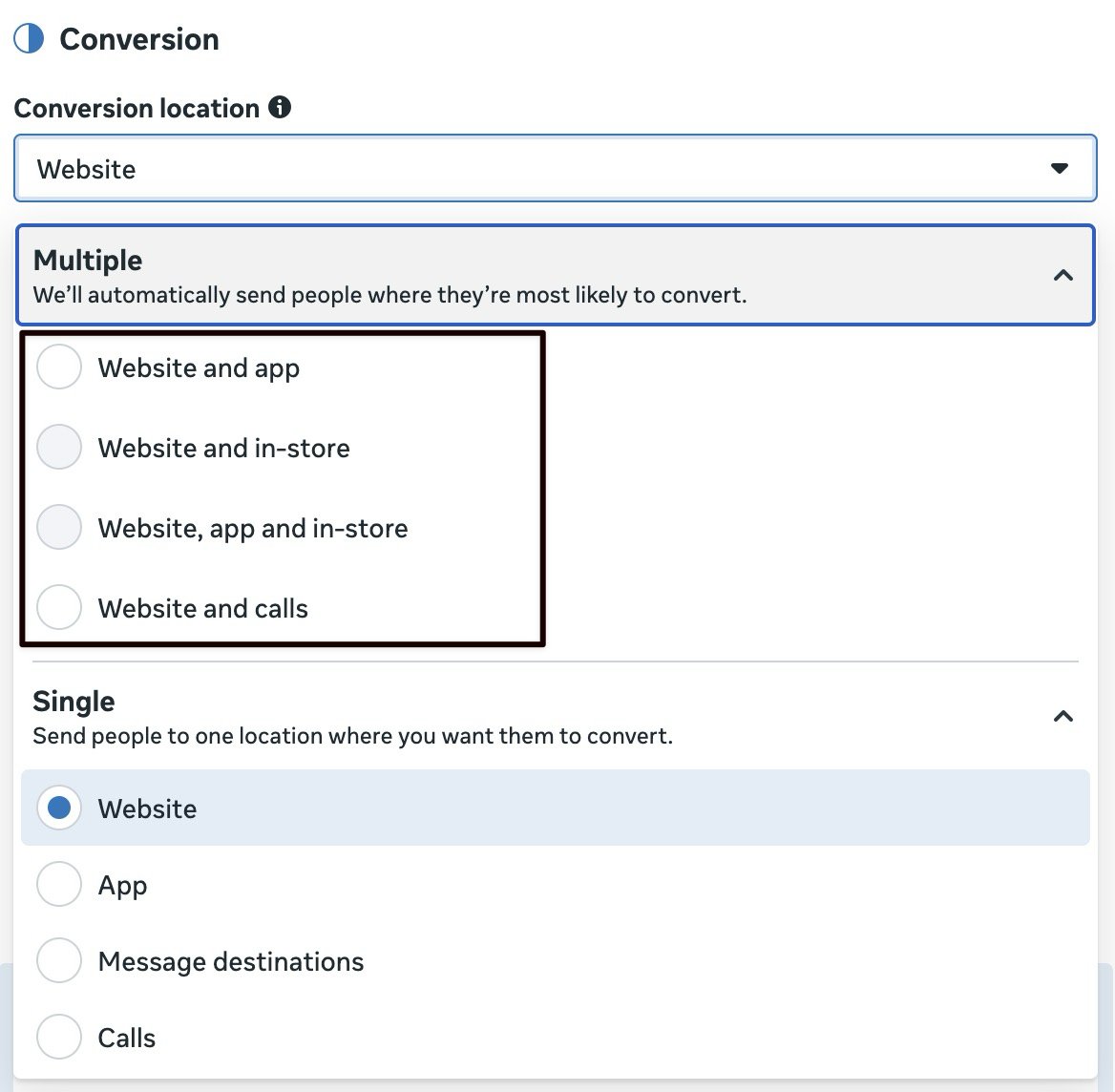
For Meta Ads leads campaign, we can select multiple conversion locations, but this seems to only include Website And Calls
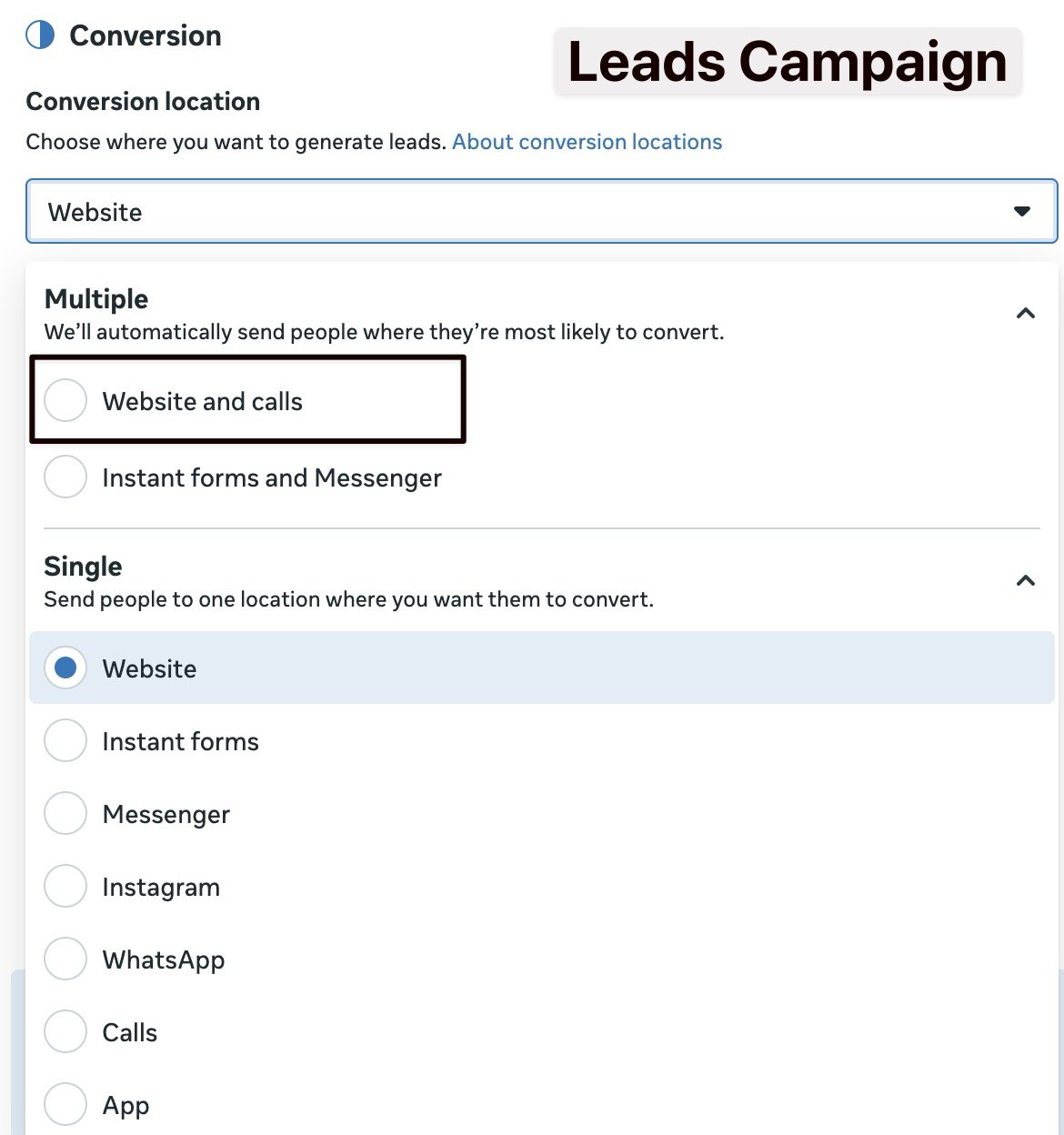
and importantly, “Maximize number of conversions is the only performance goal available for this conversion location.”
If we do a Leads campaign and we send offline phone call conversions like this including the conversion value, like a $10,000 lead over the phone…
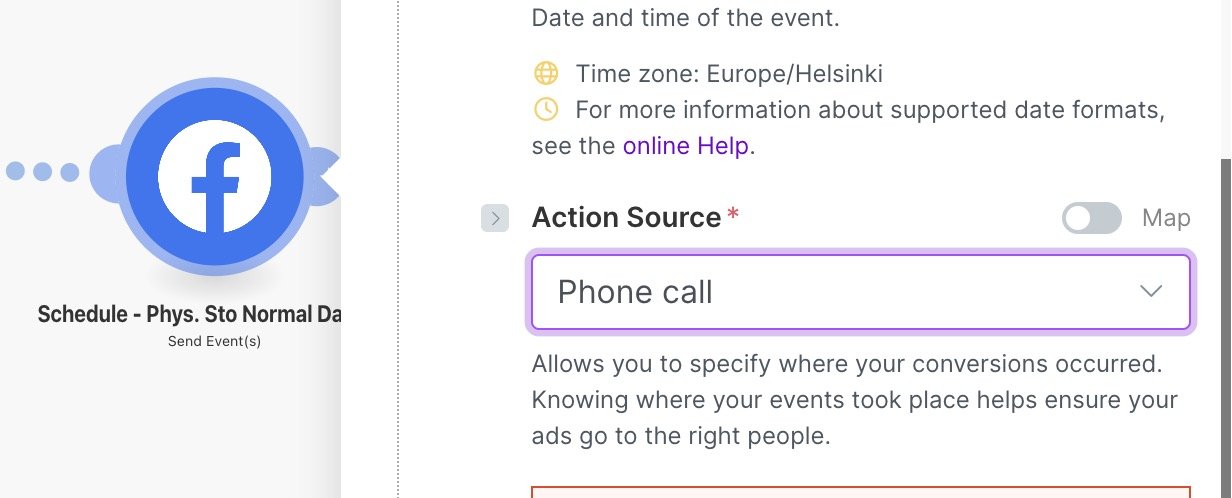
… we can only do Maximize number of conversions, not use Maximise conversion value.
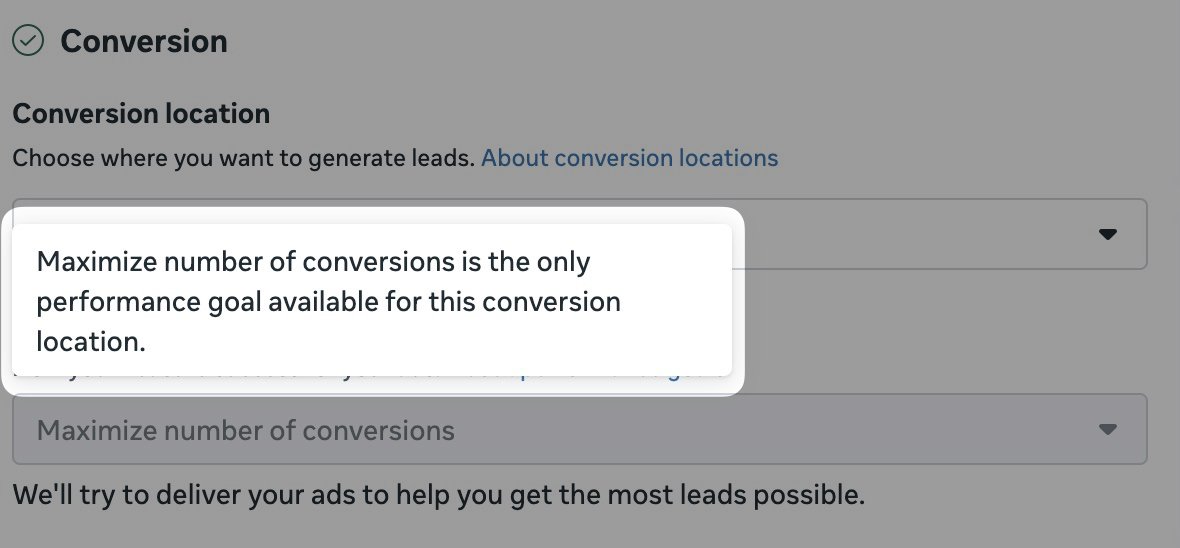
For sales campaign with Purchase event, we have all options at our disposal.
And we unlock the most profitable Maximize value of conversions performance goal.
Enable ‘Extend attribution uploads’ and ‘Allow historical conversion uploads’
In your Facebook ads dashboard, undet Events Manager settings, we wanna check ‘Extend attribution uploads’ and ‘Allow historical conversion uploads’.
I do not believe there is any downside to doing this.
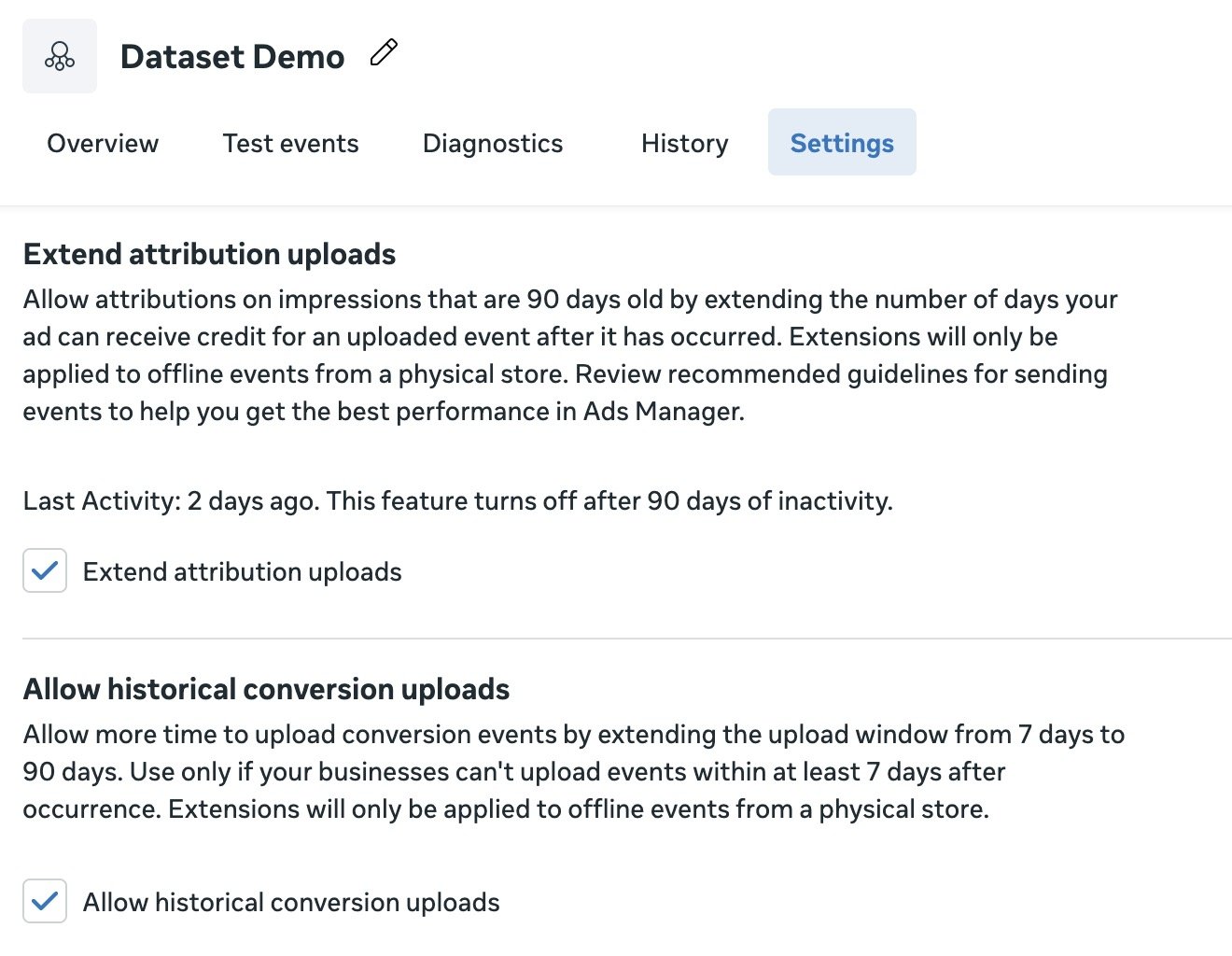
These two sound a bit similar and it’s easy to mix them up. Here’s what they do
Extend attribution uploads (90-day attribution)
Changes how far back Meta can attribute credit to an ad impression.
Normally, Meta might only credit a recent impression/click (e.g., 7–28 days back depending on setup). This lets Meta still give attribution credit to impressions up to 90 days old.
Example: someone saw your ad 60 days ago, then later you upload a store lead → Meta can say “that ad helped” and show it on the campaign.
✅ affects attribution reporting range
❌ does not change when you are allowed to upload events
After you enable it, offline events can be attributed to impressions as far back as:
- 7 days
- 28 days
- 90 days ✅ (this is the extension you turned on)
So in Ads Manager, you could eventually see attribution credit on your campaign results from very old impressions (up to 90 days back), instead of only the default shorter look-back.
Useful for long sales cycles.
Allow historical conversion uploads
Changes how late you are allowed to upload the offline event after it happened.
- Default: Meta expects offline events within ~7 days
- This allows uploads up to 90 days after the event occurred
Example: appointment happened 30 days ago, you upload it today → Meta will still accept and process it.
✅ affects upload acceptance window
❌ does not change impression attribution look-back range
Need help setting up Meta Offline Tracking?
The tricky parts in my experience are going through the tiny little settings that may block your offline conversions from showing up, as well as actually getting the Facebook click ID, user agent, IP address, etc. into your system and formatting them properly so your tracking is actually accurate.
If you would like help with this, get in touch.
Just head over to my contact page and let me know what’s holding you back. I’d love to help you sort things out for that sweet ROAS boost we all love.